INDIA
INDIA USA
USA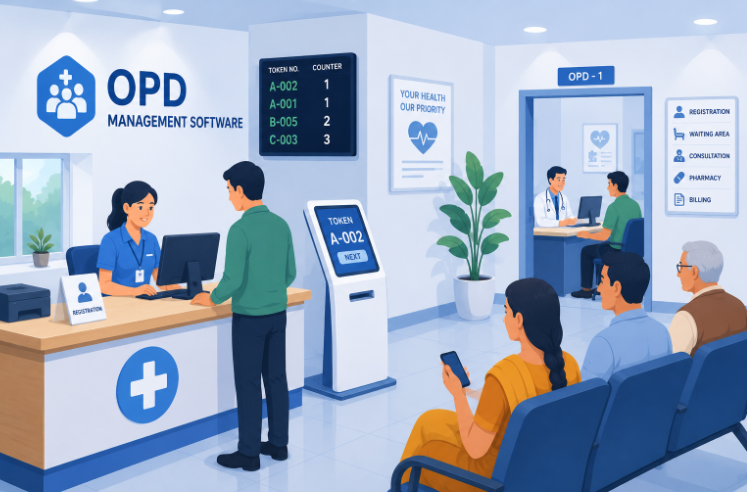
OPD Management Software for Faster Outpatient Services in India
Spend a morning in a busy Indian OPD and you'll see the same pattern everywhere — a packed waiting area, a register being flipped through at the front desk, and patients asking the same question over and over: “how much longer?” Most of that friction has nothing to do with how many doctors are on duty. It comes down to how the flow is managed. That's precisely the gap opd management software is meant to fill, and for outpatient departments across India handling growing daily footfall, it's become less of an upgrade and more of a basic expectation.
A Typical OPD Day, Before and After Digitization
Picture a mid-sized hospital OPD on a Monday morning. Without a proper system, registration happens on paper or in a basic spreadsheet, doctor schedules live in someone's memory or a whiteboard, and patients have no real way of knowing how long they'll wait beyond asking the person next to them.
Now picture the same morning with things actually organized — patients register in minutes, know roughly when they'll be seen, and staff aren't spending half their morning answering “where do I go” questions. The difference isn't more staff or more space. It's simply a workflow that doesn't rely on memory, paper, or guesswork.
It's worth being honest about something here: no software fixes a genuinely understaffed OPD. What it does fix is the wasted time around the actual consultation — the searching, the re-asking, the manual cross-checking — which, in most hospitals, adds up to a surprising share of a patient's total visit time.
Step 1: Registration Without the Queue at the Door
OPD registration is where most of the day's delays either get avoided or get baked in early. A patient walking in for the first time needs their basic details captured once, correctly, and made available to whichever doctor they see — not re-collected at every stop along the way.
Returning patients should be even faster — a quick lookup by phone number or existing ID, rather than starting from scratch each visit. This single step, done well, tends to have the biggest visible impact on how the rest of the day feels for patients.
There's also a quieter benefit here that's easy to overlook: accurate registration data upfront means everything downstream — billing, prescriptions, follow-up reminders — is tied to the correct patient record from the start, instead of someone discovering a mismatched entry three steps later.
Step 2: Getting Patients to the Right Doctor, Faster
Appointment scheduling and doctor availability go hand in hand. A patient shouldn't have to call three times to find out if a doctor is even in that day, and front-desk staff shouldn't have to manually track who's running late or who's free.
When availability is visible in real time, patients can be directed to the right doctor immediately, walk-ins can be slotted in without disrupting the whole schedule, and staff stop playing telephone between departments just to confirm something as basic as “is Dr. Sharma in today?”
Step 3: Managing the Waiting Room Itself
Queue and token management is where waiting-time reduction actually happens, or doesn't. A digital token system, paired with a visible display or SMS updates, means patients aren't stuck standing near a desk asking if they've been called yet — they can step away, know roughly when to return, and the front desk isn't fielding constant interruptions.
This alone often changes how an OPD feels to patients, even before anything about the actual consultation improves. Waiting is tolerable when people know what to expect; it's the uncertainty that frustrates people most.
Step 4: What Actually Happens Inside the Consultation Room
Once a patient reaches the doctor, the consultation should move quickly precisely because the groundwork's been done — patient history, previous visits, and past prescriptions should already be pulled up, not searched for while the patient waits.
Prescriptions written digitally reduce the classic problem of illegible handwriting causing pharmacy mix-ups, and having patient history on screen means a doctor isn't relying purely on what a patient remembers to tell them about a visit from eight months ago.
This also quietly protects doctors, not just patients. A documented history of what was prescribed and why holds up far better during any later dispute or insurance query than a memory of “I think I gave them something for that.”
Step 5: Closing the Loop — Billing and Follow-Up
OPD billing should be quick and shouldn't require the patient to walk to a separate counter and repeat their details all over again. Ideally, charges from the consultation flow straight into billing, and the patient walks out with a clear invoice rather than a vague verbal total.
Follow-up matters just as much, and it's the part that gets skipped most often. A simple reminder for a follow-up visit or a pending test result closes the loop properly, instead of leaving it entirely up to the patient to remember.
Hospitals that track this properly often notice something else too — fewer patients falling through the cracks after a first visit, which matters both for patient outcomes and for the hospital not losing a returning patient simply because nobody followed up.
Seeing the Bigger Picture: Reports and Multi-Department Support
A single day of smooth OPD Management is good; being able to see patterns across weeks and months is what actually helps a hospital improve. Reports on patient footfall by hour, which doctors are consistently overbooked, and where average wait times are creeping up give administrators something concrete to act on instead of relying on gut feeling.
This becomes even more important once a hospital runs multiple doctors across multiple departments. Cardiology, general medicine, orthopedics — each may have its own patient flow, but administrators still need one combined view of what's happening across all of them, not five separate registers to cross-reference.
It also helps when departments are added or expanded over time. A hospital that starts with three OPD specialties and grows to eight shouldn't need to rebuild its entire workflow from scratch — the underlying system should be able to absorb new departments without turning into a patchwork of half-connected additions.
What to Expect From Good OPD Management Software
Beyond the day-to-day workflow, it's worth checking how well a system connects to everything else a hospital runs on. OPD management software that works in isolation — handling registration and queues but disconnected from EMR records or the hospital's broader HMS — ends up creating exactly the kind of fragmented data hospitals are trying to move away from.
I Can Care Flow builds its OPD workflow with exactly this kind of connection in mind — registration, scheduling, consultation, and billing sitting inside one system rather than as a standalone tool bolted onto the rest of hospital operations.
FAQs
What's the main benefit of opd management software over a manual register?
The biggest difference is speed and visibility — registration, doctor availability, and queue status are all visible in real time, instead of staff manually tracking each of these separately throughout the day.
Can this kind of system handle multiple doctors across different departments?
Yes, that's typically one of the core requirements. Each department can run its own schedule and queue while administrators still get one combined view across the entire OPD.
Does it help reduce patient waiting time, or just digitize the same process?
When implemented properly, it does both — the process gets digitized, but the visibility it creates (real-time queue status, accurate doctor availability) is what actually cuts down the waiting itself, not just the paperwork around it.
Is OPD software useful for small clinics, or only large hospitals?
Small clinics benefit too, particularly around registration and queue handling. The features may be used more lightly than in a large multi-department hospital, but the core time savings apply at almost any scale.
How long does it usually take staff to get comfortable using it?
Most front-desk and nursing staff pick up the day-to-day basics — registration, queue handling, appointment lookup — within the first week or two, with a shorter learning curve than most people expect from new hospital software.
Conclusion
Most of what frustrates patients in an OPD — long waits, repeated questions, unclear billing — comes down to workflow, not staffing. Getting opd management software right means registration, scheduling, consultations, and billing all move as one connected process instead of five separate steps patients have to manually shuffle between. For hospitals in India dealing with rising outpatient volumes, that kind of smooth flow is quickly becoming the difference between an OPD patients dread and one they barely think twice about.
See How Much Faster Your OPD Could Run
Walk through how I Can Care Flow handles registration, queues, and billing for OPDs like yours — no commitment, just a look at how it actually works.